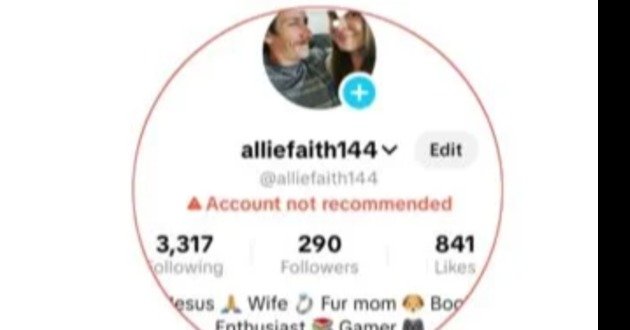
TikTok creators sometimes face a frustrating problem where their account or videos become less visible on the For You feed. You may notice a sudden drop in views, reduced reach, fewer impressions, or a notification saying that your account or content is not eligible for recommendation.
This issue can affect the growth of a TikTok account because the For You feed plays an important role in content discovery. TikTok states that content that is unsuitable for a broad audience may become ineligible for the For You feed. Repeatedly posting content that is not eligible for recommendation can also make an account harder to find.
The good news is that TikTok provides an appeal process for creators who believe their content or account was incorrectly restricted. You can also review your account status and identify possible content violations.
This guide explains the TikTok not recommended problem, its possible causes, how to appeal, how to check account status, and practical steps that can help you maintain healthy account activity.
What Does TikTok Not Recommended Mean?
When TikTok marks an account or post as not recommended, it means the content may receive limited recommendation through the For You feed.
TikTok explains that posts that are not suitable for a broad audience may become ineligible for the For You feed. Such content may also become harder to discover through search.
This does not necessarily mean that your account has been permanently banned.
A post can be restricted from recommendation while your account remains active.
The restriction can affect:
Video reach.
For You feed exposure.
New audience discovery.
Search visibility.
Organic growth.
Follower acquisition.
The exact effect depends on the reason for the restriction and the account’s overall status.
Why Does TikTok Say My Account Is Not Recommended?
TikTok may restrict an account when it repeatedly publishes content that is unsuitable for recommendation.
TikTok states that accounts that repeatedly post content that is not eligible for the For You feed may have their posts and account excluded from recommendation and become harder to find. (TikTok Support)
Possible reasons can include:
Repeated Community Guidelines violations.
Content unsuitable for a broad audience.
Copyright related problems.
Spam-like activity.
Misleading content.
Repetitive uploads.
Potentially harmful content.
Content that receives moderation action.
Multiple posts becoming ineligible for recommendation.
The exact reason depends on the notification TikTok displays on your account.
What Is The Difference Between A Video Restriction And Account Restriction?
A video restriction applies to a specific post.
An account recommendation restriction can affect the visibility of your account and multiple posts.
TikTok provides separate information for posts that become ineligible for the For You feed and accounts that become ineligible for recommendation.
If only one video has a problem, you should examine that video’s analytics and notification.
If your entire account receives a recommendation warning, check the account notification and review the affected content.
How To Check If Your TikTok Account Is Not Recommended
You should first confirm whether TikTok has actually restricted your account.
Open TikTok.
Go to your Profile.
Look below your username for an account recommendation notification.
You may also receive a notification in your Inbox.
TikTok says that when an account becomes ineligible for recommendation, the creator receives a notification explaining the issue and identifying content that has been marked. (TikTok Support)
Do not rely only on a sudden decrease in views.
A view decline does not automatically mean that your account has received a recommendation restriction.
Check Your TikTok Account Status
TikTok provides an Account Status feature that helps creators troubleshoot account standing and post performance concerns. (TikTok Support)
To check your account status:
Open TikTok.
Go to Profile.
Tap the Menu button.
Open Settings and privacy.
Look for the account status or safety related section.
Review available warnings and violations.
Pay attention to recent notifications.
If TikTok identifies a violation, read the reason carefully before submitting an appeal.
How To Appeal TikTok Not Recommended Account
If you believe TikTok incorrectly marked your account as not eligible for recommendation, you can submit an appeal.
TikTok provides an appeal process for accounts that are not eligible for recommendation. (TikTok Support)
The general process is:
Open TikTok.
Go to Profile.
Find the notification below your username stating that your account is not eligible for recommendation.
Tap the notification.
Review the affected content.
Tap Appeal.
Follow the instructions shown by TikTok.
Submit your explanation.
Wait for the review.
TikTok can restore recommendation eligibility when an appeal is successful.
How To Appeal A TikTok Video That Is Not Eligible For The For You Feed
If the problem affects a specific video, you can appeal directly from that post.
Open the affected video.
Tap More insights or the More options button.
Open Analytics.
Find the notification about For You feed eligibility.
Review the reason.
Tap Appeal.
Submit your explanation.
TikTok states that creators can appeal when they believe a post was incorrectly made ineligible for recommendation.
What Should You Write In A TikTok Appeal?
Keep your appeal short and factual.
You can write:
“My content appears to have been marked as ineligible for recommendation. I believe this decision may have been made in error. I have reviewed TikTok’s Community Guidelines and believe this content complies with the applicable rules. Please review the decision again.”
Avoid aggressive language.
Do not threaten TikTok.
Do not submit the same explanation repeatedly.
Explain why you believe the specific decision is incorrect.
Do Not Delete Everything Immediately
Some creators immediately delete large numbers of videos after receiving a recommendation warning.
That may not solve the underlying problem.
TikTok states that deleting content does not remove account strikes, and violations can still be considered after content is deleted.
First identify the reason for the restriction.
Then decide what action is appropriate.
Review Your Recent Videos
Go through your recent uploads carefully.
Look for content that could have triggered moderation.
Check:
Captions.
Hashtags.
Audio.
Images.
Video clips.
Text overlays.
Claims.
External links.
Copyrighted material.
Sensitive subjects.
Potentially misleading information.
Repeated content.
If you identify a clear problem, avoid repeating the same type of content.
Avoid Repeated Violations
Repeated violations can create more serious account problems.
TikTok uses strikes to track Community Guidelines violations. The number and severity of violations can influence enforcement actions. TikTok states that strikes expire after 90 days and are no longer considered toward a permanent account ban after that period.
This makes compliance important even after your account returns to normal.
Follow TikTok Community Guidelines
Your content should comply with TikTok’s current Community Guidelines.
Before publishing sensitive content, consider whether it could be unsuitable for a broad audience.
TikTok specifically states that content may be excluded from For You recommendations when it is not suitable for a broad audience.
Review the guidelines regularly because platform policies can change.
Avoid Spam-Like Posting
Posting many low-quality videos within a short period can make your account strategy less effective.
Instead of uploading large numbers of similar videos, focus on creating useful and original content.
A better approach is:
Create a clear topic.
Produce original videos.
Use relevant captions.
Use relevant hashtags.
Avoid unnecessary repetition.
Study your analytics.
Improve future videos based on performance.
Do Not Reupload Other Creators’ Videos
Reused content can create problems when you repeatedly upload material that you do not own or have permission to use.
Avoid downloading another creator’s video and uploading it as your own.
Create original content whenever possible.
If you use third-party material, make sure you have the necessary rights and that your use complies with TikTok’s policies.
Be Careful With Copyrighted Music And Videos
Copyright issues can affect content.
Do not assume that because a video is available online, you can freely copy it.
Use content that you created yourself or have permission to use.
When using music, images, clips, or other media, follow the applicable rights and platform rules.
Avoid Misleading Captions
Your caption should accurately describe your video.
Avoid making exaggerated claims simply to increase clicks.
For example, do not use a caption that promises something completely different from what the video actually provides.
Misleading content can damage audience trust and may create moderation concerns.
Use Relevant Hashtags
Hashtags should describe your actual content.
Avoid filling captions with unrelated trending hashtags.
For example, if your video is about education, use relevant educational hashtags rather than adding unrelated viral terms simply because they are trending.
Relevant hashtags can help TikTok understand the subject of your content.
Improve Your Video Quality
If your account is experiencing low reach, focus on content quality instead of trying to force the algorithm.
Improve:
Video clarity.
Lighting.
Audio.
Opening hook.
Editing.
Story structure.
Caption.
Audience relevance.
A strong first few seconds can help viewers understand why they should continue watching.
Improve Audience Retention
Viewer behavior matters to content distribution.
TikTok explains that For You recommendations can be influenced by interactions such as watching, liking, sharing, and commenting on similar content.
Create videos that provide value quickly.
Avoid unnecessarily long introductions.
Start with the main topic.
Keep the presentation focused.
Do Not Buy Fake Engagement
Avoid buying:
Fake followers.
Fake likes.
Fake views.
Fake comments.
Automated engagement.
Artificial engagement services.
These methods do not create a genuine audience.
They can also make your analytics less useful because your follower and engagement numbers no longer represent real audience interest.
Avoid Automated Account Activity
Do not use suspicious automation tools to artificially increase engagement.
Avoid services that promise:
Thousands of followers overnight.
Guaranteed viral views.
Automatic likes.
Automatic comments.
Automatic follows.
Artificial engagement can create account quality problems and does not provide sustainable growth.
Do Not Create New Accounts To Evade Restrictions
Creating another account specifically to avoid an existing restriction can create additional problems.
TikTok states that it may restrict or permanently ban accounts used to intentionally avoid an existing restriction or ban.
If you believe your account received a restriction incorrectly, use the official appeal process instead.
Give Your Account Time To Recover
If your content follows the rules after an issue, focus on maintaining consistent compliant activity.
Do not repeatedly upload questionable content while waiting for an appeal.
Continue creating original videos that follow the platform’s policies.
Your account history and future content both matter.
Check Analytics Regularly
Analytics can help you understand whether your problem is a policy restriction or simply weak content performance.
Look at:
Views.
Average watch time.
Traffic sources.
Audience retention.
Likes.
Comments.
Shares.
Profile views.
Follower growth.
If TikTok has marked a post as ineligible for the For You feed, analytics can also provide information about the decision. TikTok instructs creators to enable analytics to view certain recommendation eligibility decisions.
Why TikTok Views Suddenly Drop
A sudden view decline does not always mean that your account has been restricted.
Other factors can include:
Lower audience interest.
Weak opening.
Poor retention.
Changing trends.
Different content topics.
Competition.
Seasonal audience behavior.
Lower engagement.
Changes in recommendation patterns.
Therefore, check your notifications and account status before assuming that you have a restriction.
Why Videos Stop Appearing On The For You Feed
A post may stop receiving For You exposure if TikTok determines that it is not eligible for recommendation.
TikTok says that when a post is ineligible, it will not be displayed in the For You feed unless the decision is successfully appealed.
The correct solution depends on the reason shown in your analytics.
How To Recover TikTok Reach
Focus on compliant and original content.
Create videos around one clear topic.
Improve your first few seconds.
Use clear audio.
Avoid misleading captions.
Use relevant hashtags.
Avoid repeated uploads.
Respond naturally to your audience.
Study analytics.
Avoid artificial engagement.
Most importantly, identify whether TikTok has actually restricted your account before changing your entire content strategy.
What To Do After A Successful Appeal
If TikTok approves your appeal, continue following the rules.
Do not immediately return to the content that caused the problem.
Review your previous content strategy.
Remove questionable practices.
Create original videos.
Monitor account notifications.
Keep your account activity consistent.
TikTok states that when an appeal is successful, eligible content can be restored for recommendation and applicable strikes can be removed.
What To Do If Your Appeal Is Rejected
If TikTok rejects an appeal, carefully review the reason.
Do not repeatedly submit identical appeals without new information.
Instead:
Read the notification.
Identify the specific issue.
Review the relevant guideline.
Stop repeating the problematic content.
Create compliant content.
Use TikTok’s problem reporting system if you believe there is still a technical or moderation issue.
TikTok provides a Report a Problem function through Settings and privacy. (TikTok Support)
How To Report A TikTok Recommendation Problem
If you believe your account has a technical problem, you can report it inside the application.
Open TikTok.
Go to Profile.
Tap Menu.
Open Settings and privacy.
Tap Report a problem.
Select the relevant topic.
Follow the instructions.
TikTok’s support instructions provide this route for reporting problems within the app. (TikTok Support)
Common Mistakes To Avoid
Do not panic after one low-view video.
Do not buy fake followers.
Do not repeatedly delete videos without understanding the problem.
Do not upload copyrighted content without permission.
Do not use misleading captions.
Do not repeatedly publish content that has already been flagged.
Do not create accounts to evade restrictions.
Do not trust services promising guaranteed TikTok recovery.
Do not share your TikTok password with third-party recovery services.
Frequently Asked Questions
What Does TikTok Not Recommended Mean?
It means TikTok has determined that an account or content is not currently eligible for certain recommendation exposure. This can reduce visibility in the For You feed. (TikTok Support)
Can I Appeal A TikTok Not Recommended Decision?
Yes. TikTok provides an appeal option when an account or post has been marked as ineligible for recommendation.
How Do I Appeal A TikTok Video?
Open the affected post, enter Analytics or More insights, open the notification about For You eligibility, and select Appeal.
How Do I Appeal A TikTok Account Restriction?
Open the recommendation notification on your profile or in your Inbox and follow the appeal instructions provided by TikTok. (TikTok Support)
Will Deleting A Video Remove A Strike?
No. TikTok states that deleting content does not remove strikes.
How Long Do TikTok Strikes Last?
TikTok states that strikes expire after 90 days and are no longer considered toward a permanent account ban after that period.
Does Low Reach Mean My Account Is Banned?
No. Low reach alone does not prove that your account is restricted. Check your account notifications, analytics, and account status.
Can I Create A New Account To Escape A Restriction?
Creating another account specifically to avoid an existing restriction can lead to further restrictions. TikTok advises against attempts to evade restrictions or bans.
Why Did My TikTok Views Suddenly Drop?
A drop can have many causes, including weaker audience retention, lower engagement, changing audience interests, or recommendation eligibility issues. Check your account status before assuming a restriction.
Can TikTok Restore My Account Recommendation Status?
Yes. TikTok states that account reputation can be restored depending on the amount and type of content that was unsuitable for recommendation. You can also appeal when you believe the decision was incorrect. (TikTok Support)
Should I Stop Posting After Getting A Not Recommended Warning?
Focus on creating compliant, original content. Avoid repeating content that may have caused the restriction while you review the issue or wait for an appeal.
Can Hashtags Cause TikTok Recommendation Problems?
Irrelevant or misleading hashtags can weaken your content strategy. Use hashtags that accurately describe your video instead of adding unrelated trending terms.
Can Buying Followers Fix TikTok Reach?
No. Purchased followers do not provide genuine audience engagement and can make your analytics less meaningful.
How Can I Increase TikTok Reach After A Restriction?
Follow the Community Guidelines, create original content, improve viewer retention, use accurate captions, avoid artificial engagement, and monitor your analytics and account status.
Final Thoughts
The TikTok not recommended problem can reduce the visibility of your content and limit For You feed exposure. The first step is to determine whether TikTok has actually restricted your account or whether your views simply declined because of normal performance factors.
If TikTok has marked your account or video as ineligible for recommendation, review the reason carefully and use the built-in appeal process when you believe the decision is incorrect. TikTok officially provides appeals for recommendation eligibility decisions.
For long-term account growth, focus on original content, accurate captions, relevant hashtags, good viewer retention, genuine engagement, and compliance with TikTok’s rules.
Avoid fake engagement, repeated policy violations, misleading content, unauthorized copyrighted material, and attempts to bypass account restrictions.
A careful review of your account status, followed by consistent compliant posting, gives you a much stronger approach than repeatedly deleting videos or creating new accounts.



